
Archived from the Tools In Action forum (Pub Talk). This thread is read-only.
People are asking for advice, tips, tricks, etc., so here we go with all of that. Rather than ramble on, the best thing to do is for someone to ask a question or questions, and I’ll answer them. Makes it easier for me, and directly answers the questions. It’ll also save me the pain of my arthritis, I won’t have to do a lot of typing all at once.
First off, the simplest thing to explain…camera choice. There’s no such thing as “good” or “bad”, if the desired result is a photo, then anything called “camera” will perform. Even a cell phone camera can produce good results if you have the right settings, environment, light, etc.. Canon-v-Nikon…don’t buy into that nonsense debate. Both brands do exactly what the other does, they technical stuff may be different but they both produce great photos. Raw-v-jpg…don’t buy into that debate either. You’ve seen some of my photos, and if I do say so myself they’re excellent. I shoot primarily jpg, and have never had any issues doing so. I shoot raw occasionally, when I feel the urge, but it’s not a necessity. If the camera has a lens, and a shutter button, that’s all you need. I have a lot of photographer friends, and we all shoot different brands. Sony, Canon, Nikon, etc., and we all produce photographs. Some aren’t as good as others, but that could be simply a matter of experience and skill. The camera doesn’t have anything to do with that.
Editing is important, you can take a mediocre photo and make it better with the right kind of processing. Clarity, lighting, color, sharpness, etc., are all things that you want to “get right’ in-camera, but they’re also things that can be created in processing. You should be able to cruise through programs like Photoshop, Paint Shop Pro, Zoner Photo Studio, Lightroom, etc.. I have a lot of photo editing software and I can use all of it easily. They all do basically the same thing, Paint Shop Pro will do the same things as Photoshop, but Photoshop will allow you a greater depth. Lightroom will do the same things, but it can also do a lot more if you use it right.
Lighting is very important. With the proper lighting you can do a lot with your photos. Take for example the recent “low-light” drill photos. The low-light effect was achieved, but it would have been better and easier to shoot the subject against a black background with good lighting, and make adjustments in editing for achieve the low-light effect. Better detail and clarity would have been seen, and the color tones would be better. Not saying the photos aren’t nice, but in my perspective regardless of the desired effect, I still want to see the true colors and details of the tools. Low-key as well as high-key photography takes the right kind of light, the right kind of environment, to be pulled off good. If I was going to do this type of photo I’d do it where I had the best lighting, maybe the bathroom. The bathroom typically has brighter lighting, and it’s more uniform lighting because it’s in a confined space. Unless you’re a millionaire and you have one of those bathrooms that’s the size of my house. I posted this photo in the chat…
[External image (farm9.staticflickr.com), not copied]
December 20 003 by Edward Durbin, on Flickr
…to show what a low-key photo can look like. This was shot with a single flash, which filled the room with light. All I did was shoot a typical product shot, on a black background, and then make simple adjustments in processing to give the effect of low light. This is anther example, although not as “dark” it still gives off the effect of having dimmer light…
[External image (farm9.staticflickr.com), not copied]
December 13 001 by Edward Durbin, on Flickr
As a comparison, here is another shot on the same type of background, only it’s “brighter”…
[External image (farm8.staticflickr.com), not copied]
April 13 004 by Edward Durbin, on Flickr
Same type of background, same exact one-flash method, but different results due to processing adjustments. Stuff like this is easy, and even if you don’t have equipment you can still get the same results. Let’s say you’re using your cell phone, turn the flash on if it has one, and put a spoon under it to direct the light into the room instead of at the subject. I’m going to grab my cameras and cell phone and do some “test” shots to show you what kind of results you can get with a spoon and cell phone.
Okay, that’s it for now, my hands are getting numb. Please ask questions, I love babbling about photography. Well, I actually like babbling about anything that I know a lot about, photography, astronomy, martial arts, knives, etc.. But we’re talking photography here, so ask away. I will answer as many questions as I can, if I don’t know an answer I’ll research the question. Hopefully this can develop into a good resource for anyone looking for photo advice, tips, tricks, etc..
thanks for this I am sure it will help many people….with their photography endeavors….I have always dabbled in photography for many years but usually not much better than entry level. The biggest achievement for me with photography was having a camera or 2 around and one of my kids getting the bug early and has become quite the photographer. Although she grew up and became a dentist her love of photography has grown from her asking me questions when she was 8 years old to me asking her questions………
You and everyone else is welcome. If you have any questions let me know.
This is generous of you, very cool!
Do you have an example of before and after processing and the explanation of what you did to the photo?
Sent from my SCH-I535 using Tapatalk
I can dig out the original photos and show a before/after, just give me a little time to find the photos.
Thanks for all your time staring this thread Kato
I have to assume that most of the gibberish coming out of me is stuff that people already know. How to use photo editing software to make adjustments. If not, if my terminology evades please say so, I can explain what editing steps are and how to use them. I will be using Paint Shop Pro X2 for most of the photo stuff, but if you need specifics in Photoshop, Lightroom, etc., just let me know. I can run those and do screenshots no problem, I’m very well-versed in most of the editing software that exists these days.
The Mustang was basically created that way in-camera. I adjusted the flash output lower and lower until I got the effect I wanted. But, the same results can be had by shooting a bright photo and adjusting it in processing. The easiest thing to do is duplicate the layer and change the layer properties to “multiply”, this will drop the overall exposure of the shot. From there you can adjust the opacity of the duplicate layer to suit your needs. I raised the exposure of this example to show what the results will look like.
[External image (i15.photobucket.com), not copied]
Stating with the original, you duplicate the layer by going to “Layers” then “Duplicate”. You then go to the layer properties drop-down and choose “Multiply”. If it’s too dark you can fine-tune by using the opacity slider.
[External image (i15.photobucket.com), not copied]
[External image (i15.photobucket.com), not copied]
[External image (i15.photobucket.com), not copied]
These steps can be enough to create a low-key effect, but you may want to fine-tune the brightness of the subject or change the color saturation or clarity. And…this would all be way easier for me if I had a “preview’ so I could see what the stuff I’m typing looks like. But for now, I’ll suffer through…
To do more fine-tuning, or to get a different effect, you can use the Histogram. This will allow a greater amount of adjustment, and give you the ability to fine-tune different areas of the photo. Again, duplicate the layer, then select the Histogram. To make the background darker, grab the slider on the left and drag it to the right…
[External image (i15.photobucket.com), not copied]
There is a broad range of adjustment with the Histogram, you can move the sliders around to see what happens. Plus, with the duplicate layer, you can make the Histogram adjustments, then change the opacity of the layer to get even more fine-tuning.
I was using Photoshop before it was Photoshop, so I have a tiny bit of skill with it. I prefer Paint Shop Pro though, it has a much better interface, you can customize the workspace to suit your needs. My workspace is designed so that the tools I use the most are on the toolbar, so everything is one click away. Streamlines the whole process. I use Photoshop from time to time, when necessity calls for it. I also use Lightroom, Elements, Zoner, etc.. I have enough photo programs to choke a horse
Layers are handy because you’re creating non-destructive edits, you can delete a layer any time you want without harming the original file. Plus, you can toggle the layers so you can see what effects are happening, instead of constantly going to the “undo” feature. Brightness/contrast adjustments are nice but they won’t accomplish the same effects as the Histogram or what “multiply” will do. Plus, you can get a better brightness adjustment by using a duplicate layer then changing the layer properties to “screen”. It gives you basically the same effect as raising the exposure. Plus, again, with the opacity slider you can fine-tune the effect a ton.
To achieve a black background without an actual black background, just use a dark room and keep your subject farther away from anything in the background. This will make it easier to darken things in processing. What your subject sits on, in your case the carpet, isn’t a big deal, if it shows it shows. But, keeping the subject farther from anything in the background will make it easier to edit that stuff out and make the background cleaner. You don’t want everything to disappear, you don’t want your subject to appear to be floating. Having some foreground/background is good just to show placement. With your shots it’s not so much the overall lighting but also the color tones and noise. Having better light means you can control other aspects better. Using actual low light introduces issues, when you try to up the ISO or drag the exposure you add more noise to the photo, and the camera won’t see true color.
Give me a few minutes to find a suitable subject and I’ll take a few example photos.
To start off, here is the difference when using on-board flash. Without any assistance the flash will “blind” the subject, this is why you get red eye, and why you get a photo flooded with light. It’s not uniform and it’s too bright. Doing something silly, and simple, like adding a spoon into the equation, and your light is much better. Here is an example using a paracord keychain I made…
No spoon, direct light from on-board flash…
[External image (i15.photobucket.com), not copied]
Adding a spoon under the flash to direct the light into the room instead of at the subject…
[External image (i15.photobucket.com), not copied]
Now, the one thing needed is to boost the exposure, because when you direct the light it creates a dimmer photo. This is easy to fix by duplicating the layer and changing the layer properties to “screen”. it’ll boost the overall exposure without killing detail or blowing highlights. You can also add fill light or adjust clarity to give a more pleasing subject. With this example all I did was duplicate the layer and change the layer properties to “screen” twice, then add a little bit of fill light. After these initial adjustments, I can do anything I want, like adjust color or saturation, adjust sharpness, etc..
Another way to edit is to use the Histogram to make lighting adjustments. This is done with a simple Histogram adjustment…
[External image (i15.photobucket.com), not copied]
Basically the same results, improving the exposure, but a different method. It needs more adjustment if you want it brighter, but you can get the idea.
Knowing the principles of good lighting, you can create virtually any effect in-camera. “Get it right in camera” and it’s much easier to edit the photo the way you want it. So, I take a shot with nice, even lighting, and I can do what I want in processing after that. For this example I use the Histogram, making a “brightness” adjustment. The colors change slightly, but with a finished photo you wouldn’t know the difference. Plus, you can make it look how you want with other processing
Replacing the background is dependent on what’s in the background. You can use Topaz ReMask or just use the paint tool. If you don’t mind spending the time doing it that is, sometimes it’s a tedious job. And, depending on what type of background you have, methods are fairly easy. For a plain background, like black or white, you can use the Histogram to get true black or true white. For black, you’re grabbing the left slider and moving it to the right, then using the middle point you’re going to bring your subject back up. For white, it’s the opposite, you use the right slider, then the middle. Either way you get true white or true black without hurting the subject. Everything either slides to the left or to the right.
[External image (i15.photobucket.com), not copied]
[External image (i15.photobucket.com), not copied]
For an actual background, it’s harder depending on what the background is. Typically instead of removing it just try to isolate it. Give me a few minutes to put something together for an example
So, a rough example using a car photo. If I wanted to showcase the car, I’d just separate it from the background instead of trying to remove the background. It makes a better portrayal if you know the car is in a shop. Anyhoo, To separate the background the first thing I do is work on getting the car to look the way I want it to. I do a simple Histogram adjustment to brighten the car and give the background a little boost, so that lighting looks uniform. Then I duplicate the layer and apply Gaussian blur. This example is at 100% to show the results, but I’d adjust layer opacity and work the photo a bit more so that the background looked blended out instead of dropped out.
[External image (i15.photobucket.com), not copied]
[External image (i15.photobucket.com), not copied]
The good thing about this photo is that I can low-key it easily, by duplicating the layer and changing the layer properties to “multiply” or by using Histogram adjustments.
Thanks for the good tips
Background tricks. Shot this one in my backyard. Had to clone out the fence, isolate the subject, sharpen, etc..
[External image (i15.photobucket.com), not copied]
[External image (i15.photobucket.com), not copied]
You can do that type of “blur” on any photo, but it’s better to use a wide aperture, it gives a better transition. These were shot with a wide aperture, so even close-up or with other objects close to the subject, the subject stands out…
[External image (farm1.staticflickr.com), not copied]
July 03 2015 003 by Edward Durbin, on Flickr
[External image (farm1.staticflickr.com), not copied]
July 12 2015 004 by Edward Durbin, on Flickr
I won’t lie, it takes a fair amount of skill and a good eye, it’s not all camera and lens. You can take a great photo and have it ruined by not having the right elements in focus. Shoot a beautiful portrait of a beautiful woman, but her eyes are out of focus…blows the whole thing But, the right gear can make a difference, so it’s part gear and part person behind the gear
Okay, shoebox photo. I didn’t edit the results when I did this, it’s all lighting. I used an external flash, but with the right angle you can use the on-board flash and a spoon (or other shiny reflector). All I did was shoot the subject, then crop the photo to eliminate the shoebox. Same thing can be accomplished with a larger box and white paper, or a larger box and using white spray paint to coat the inside. And, if you want dark backgrounds, spray it black.
[External image (farm7.staticflickr.com), not copied]Shoebox 002 by Edward Durbin, on Flickr
[External image (farm7.staticflickr.com), not copied]Shoebox 001 by Edward Durbin, on Flickr
Should send you a picture of mine to play with it has a little wear on it you might be able to have fun eith
Jimbo
Sent from my iPhone using Tapatalk
This is very cool protool, I like how it turned out! You got your low light look! Kato I hope this in return brings you more photography work, I’m highly enjoying this thread.
Sent from my SCH-I535 using Tapatalk
PROTOOLNUT wrote:
Hello Jimbo! My brother is pretty much the king when it comes to fixing damage on photo’s. The kind of work I am doing with photoshop is enhancing, tweaking photo’s. The most complicated thing I’ve ever done with photoshop was take the picture of my xbox360 when it was brand new, and I placed it onto a picture of clouds in the sky. Then placed the controllers on each side, and had a message on it saying, your prayers answered. lol Maybe I should post that here so you can see what I did with Photoshop 10 years ago[External image (www.professional-power-tool-guide.com), not copied]
I wasn’t thinking of correcting damage but more of highlighting the wear if that makes sense.
Jimbo
Sent from my iPhone using Tapatalk
PROTOOLNUT wrote:
OK, well PM me your picture and tell me what you want and I will see if I can handle that for you.
Nah I don’t want anything dude just seeing if you wanted something to mess around with that’s all dude, is rather your efforts go to some sexy tattooed chick pictures!
Jimbo
Sent from my iPhone using Tapatalk
Loving the pics Protool and Kato
Sometimes the simplest things make a big difference. This was shot on a black t-shirt…
[External image (farm8.staticflickr.com), not copied]
Kershaw JYD 001 by Edward Durbin, on Flickr
This one was on black felt, bought at the local craft store…
[External image (farm7.staticflickr.com), not copied]
Precious Moments 006 by Edward Durbin, on Flickr
Kato wrote:
Sometimes the simplest things make a big difference. This was shot on a black t-shirt…
[External image (farm8.staticflickr.com), not copied]
Whoah I had that exact same knife, never thought I would come across a pic of it at random here. That’s their junkyard dog knife. Lost it who knows where.
Very cool stuff, sorry for the sidetrack
Sent from my SCH-I535 using Tapatalk
Yup, I am at your disposal…
Sterco asked an interesting question in the other thread that I’m curious about, and that is what to do with a condition like very shaky hands? Tripod your only answer? Breathing techniques?
Ah, thanks for reminding me, forgot to answer that one. Plenty of methods to use, easy ones too. Obvious answers a re monopod, tripod, a camera or lens with image stabilization, etc..
Some easy tricks:
1.) Tie a piece of string, paracord, etc., to a 1/4″x20x1/2″ bolt, put a fender washer on, then thread it into the tripod socket on the camera. Make the string long enough to stand on, then stand on the end and hold the camera to your eye so the string is taught, it’ll give you a little bit more stability.
2.) Proper technique, brace your elbow(s) against your body. This trick works better with a DSLR because your hand will be on the lens. Using the lens/hand arm, brace your elbow against your body. This is actually proper technique for shooting, and will give you more stability. For a smaller camera, like a point-n-shoot, brace your non-shutter hand under your shutter hand, kind of like pistol shooting. You’re going to brace your hands together. Let’s say you’re a right-handed shooter (for cameras), you’re going to put your left hand around your right wrist and fan your fingers around the backside of your right hand. Then you’re going to make sort of a triangle between your hands, elbows, and body. Always leaning into one shoulder more than the other, so your arms and camera are braced into your body and you can put your eye to the camera comfortably.
You don’t want to have the camera out away from your body, mainly because every point of contact adds more shake…hands, wrists, lower arms, elbows, upper arms, shoulders, upper body, etc.. Every piece that is farther away from the base (which is your body) means that much more distance for vibration to travel, and less ability to control it. It may feel weird at first, and it may look silly, but proper bracing techniques will give you a more solid shot.
3.) Pillows, sandbags, tables, etc.. Put the camera on something, if you’re shooting indoors use a table, the back of a chair, whatever. Something that will allow you to brace the camera or your hands against. Pillows work great because they absorb everything, you can cushion yourself really good into a pillow and see little to no shake. They actually make little sandbags for photography, that you can carry in the camera bag or even in your pocket. You toss them wherever you want and rest the camera on them.
If you’re shooting outdoors, try a stump, fence, lean against a tree, etc..
4.) In the same regard as tables, chairs, etc., you can use a wall. Lean into a wall, brace your hand against the wall, or in the least brace your body against it.
5.) the crux of your elbow. For smaller cameras, cellphone cameras, etc., the hand that’s holding the camera place your wrist into your opposite elbow, then raise your non-camera arm up. Make a triangle of sorts with your arm, and rest the camera in there. You’ll see less vibration and shake if you use a part of your body that’s closer to your base. Try it, hold the camera out at arms length, then hold it inside your elbow. It makes a pretty good difference.
I’ve used all kinds of techniques to get more stable. I’m notorious at car shows for doing the splits to get lower to the subject, and for stability. I’m also known for laying on the ground, whether it’s pavement or mud, to get better stability. I don’t like using tripods unless it’s in the “studio” doing product shots or smoke/water/paint stuff. I rely on proper bracing techniques when in the wild, and if need be I’ll lean on a tree or whatever is at hand.
I use stabilized lenses, and they help of course, but that doesn’t mean you shouldn’t use proper bracing techniques too. My 70-200mm is not stabilized, but I can hold it rock-solid without a problem so I don’t worry about shaky shots.
Thanks for the tips man!
You’re welcome of course.
Okay, so here’s a quick vid to show some editing steps you can do. I’ll explain what you’re seeing happen under the video…
For every layer I duplicate, when I’m done I merge. I prefer not to work with multiple layers going, sometimes they end up goofing each other up. You can work with multiple layers but you have to keep track that you’re duplicating the original (background) layer, and not the editing layers. Otherwise it’ll be all wonky. Throughout the vid I toggle the layers so you can see the effects. And, the photo looks weird in the video because of artifacting, caused by the screen capture software. Anyhoo, long story short…
Duplicate the layer. Apply Clarity adjustment. Drop the opacity of the layer to suit your tastes. Here I went down to 50%. Merge.
Duplicate the layer, add fill light. Drop the opacity of the layer if needed. Merge
Duplicate the layer, then click the wrong button. Cancel it and click the right one. Add unsharpen mask. Drop the opacity to suit the needs. Merge
Duplicate, run Noiseware (noise reduction). Cleans up the background, and to retain detail where it’s lost just use the eraser and erase over whatever spots you want to keep. I zoom in a bit show you can see what happens. Merge
I run a layer and use the dodge brush to show that you can brighten stuff more. Adjusting layer opacity can fine-tune that as well. I then copy the image and drop it over the original, then toggle so you can see the effects.
Duplicate, adjust saturation of blue and cyan to make background more blue. Drop opacity to suit the needs. Merge
Duplicate, adjust overall saturation, adjust opacity.
Hopefully you can follow the vid and see what I did. Of course there’s fine-tuning to be done if need be, and it’s always better to work on the original file and not a copy. Also, for your camera you can change the PPI to 72 and leave the pixel dimensions at 100% and you’ll get prints that are 64″x48″. If you retain the right numbers during editing, and save at around 7 you’ll be able to print to that size with no problem.
Sick. Thanks for the tips, I definitely need to sharpen up my game. Also for that image and others like it, should I enable backlight setting or leave it to editing?
If your camera has illumination correction, backlight, etc., leave it off. You won’t see much difference in most shots, and it’s going to take longer for the camera to process photos, which means you’ll see more lag time between photos. In-camera processing like that, and stuff like in-camera noise reduction, causes the camera to take more time on one photo, and if you shoot burst mode it’ll take longer to get shots off
Okay, noted. My burst rate isn’t fantastic to start and I have a small buffer so that helps I’m sure. My camera is more less a bridge camera so for all it’s capability it falls flat on a lot of the higher end options and features found in most DSLR’s, in exchange I can telephoto like nothing else on the market and it has good optics and stabilization (5 stop). That setting though I wasn’t too sure of if it helped in that situation or not. I’ll practice with this in mind from now on.
Point-n-shoots and bridge cameras are notorious for shutter lag. Press the shutter button, wait a second for the picture to snap. Even with built-in burst mode, 3 to 5 shots in a row take a long time, longer if you have in-camera noise reduction or peripheral illumination turned on.
I notice a fast write speed with memory card helps a bit……especially when you start shooting repeatedly ….
I bought the fastest card on the market for that reason. My lag isn’t bad, it’s just not flagship DSLR fast. I don’t feel like the camera is ever in my way of getting a shot.
I have Class 4 133x cards that do well in my cameras, but I use 400x UDMA most of the time. The only time I fall back to the 133x’s is when the two 400x’s get filled up.
I would love to see some members ask some questions, I’d hate to see all of this useless knowledge I have go to waste. Ask me anything, ask me how I shoot certain subjects, ask me how I process certain photos, ask me how much bacon costs, I don’t care. Just ask
Okay so I pulled some pictures I took last month of the full moon from my camera and started playing around with some editing. I’m just toying from free software for now (I have a chromebook so my options are limited, so Pixlr is all I can do). So I don’t have a heavy in depth level of options without a windows machine.
This is before and after edits, all hand held at max optical telephoto (2000mm 83x optical zoom) I’d like some critique if you don’t mind. I feel like I enhanced the photo but not sure if I took it the right direction or not but I tried 2 different ways. The second image for more realistic and third for enhanced details and artistic value.
The first image is not cropped and straight from camera saved on my Google Drive. 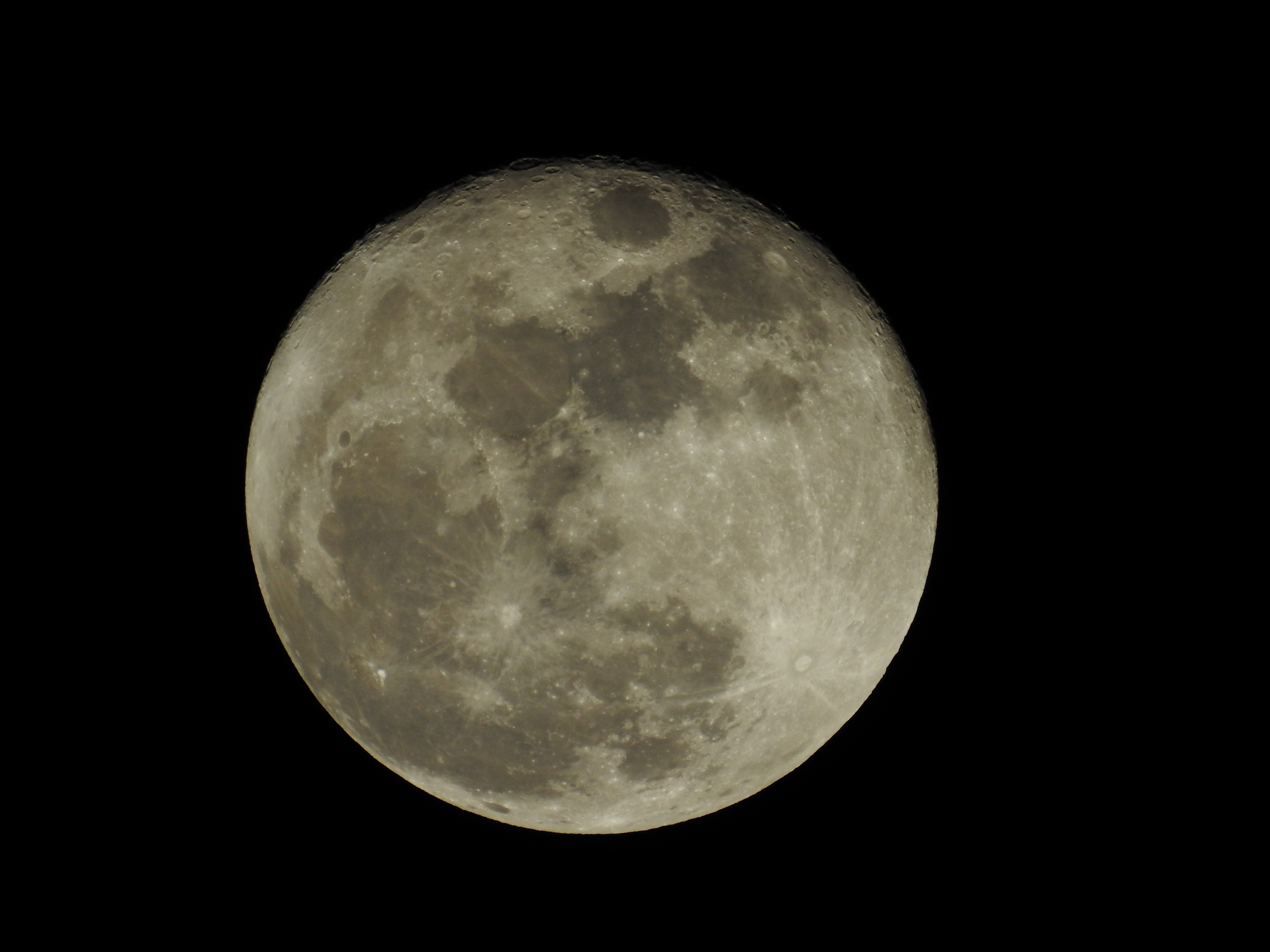
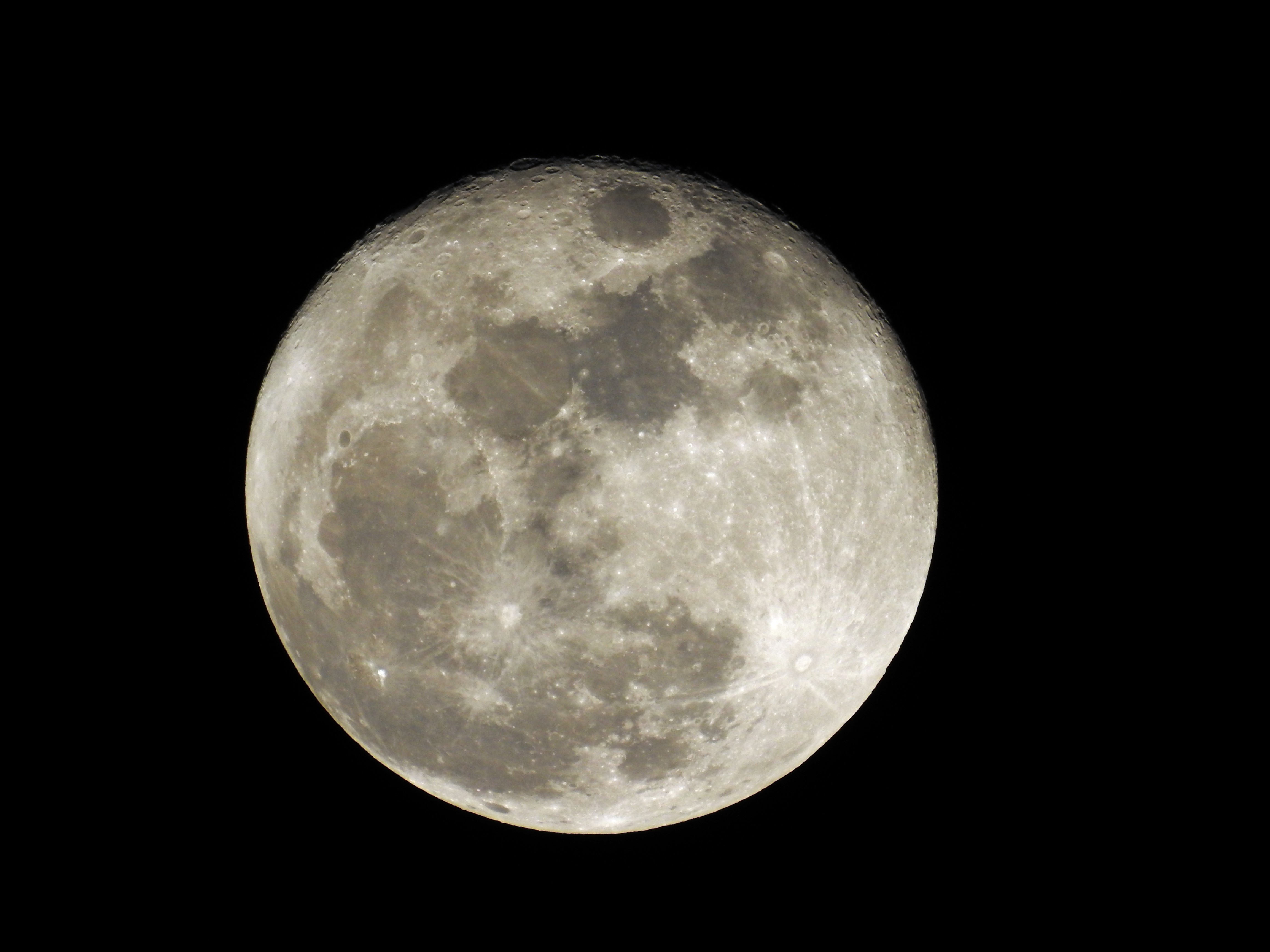
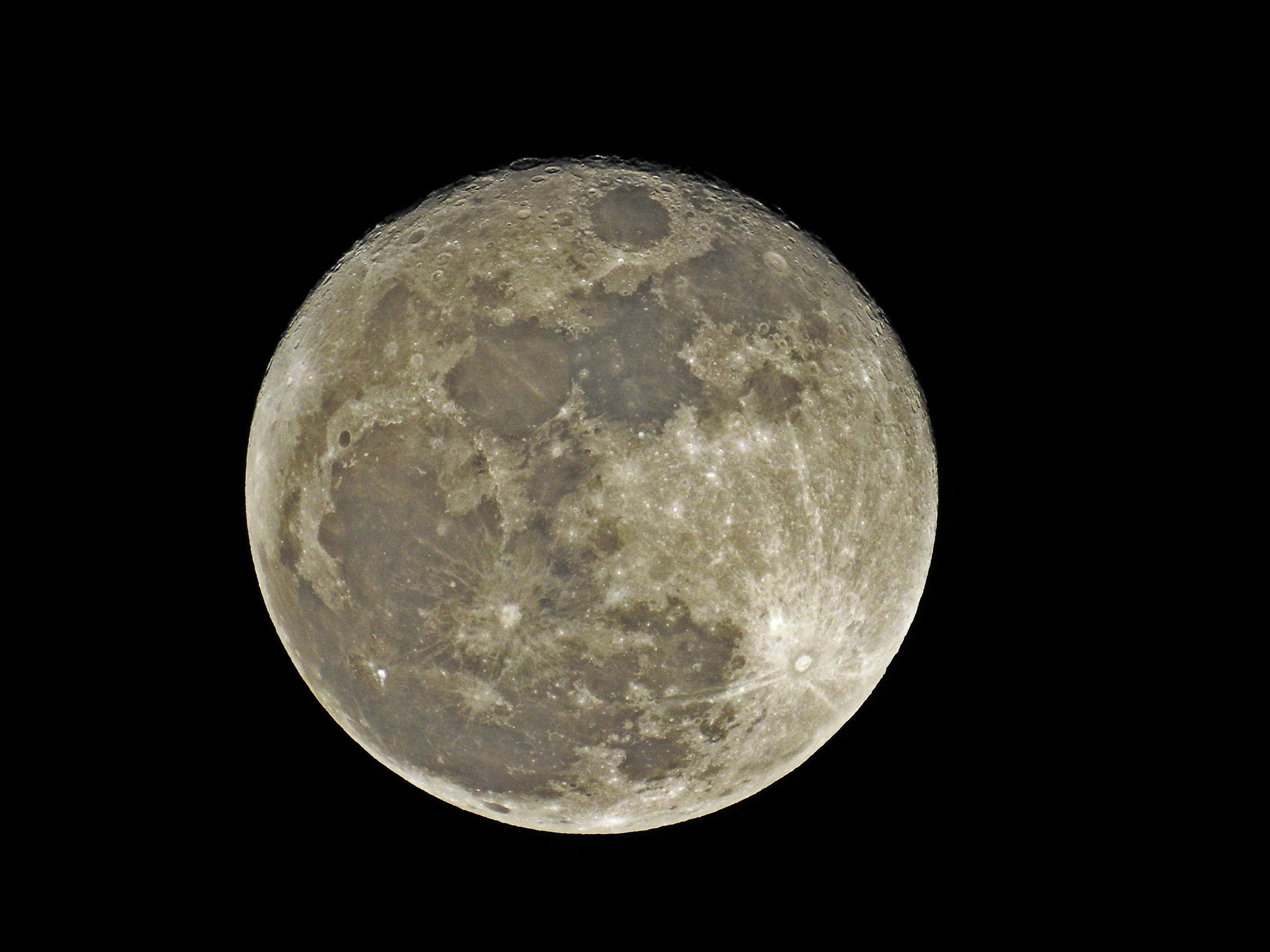
And a few more in different in camera settings that I applied light editing to as well.
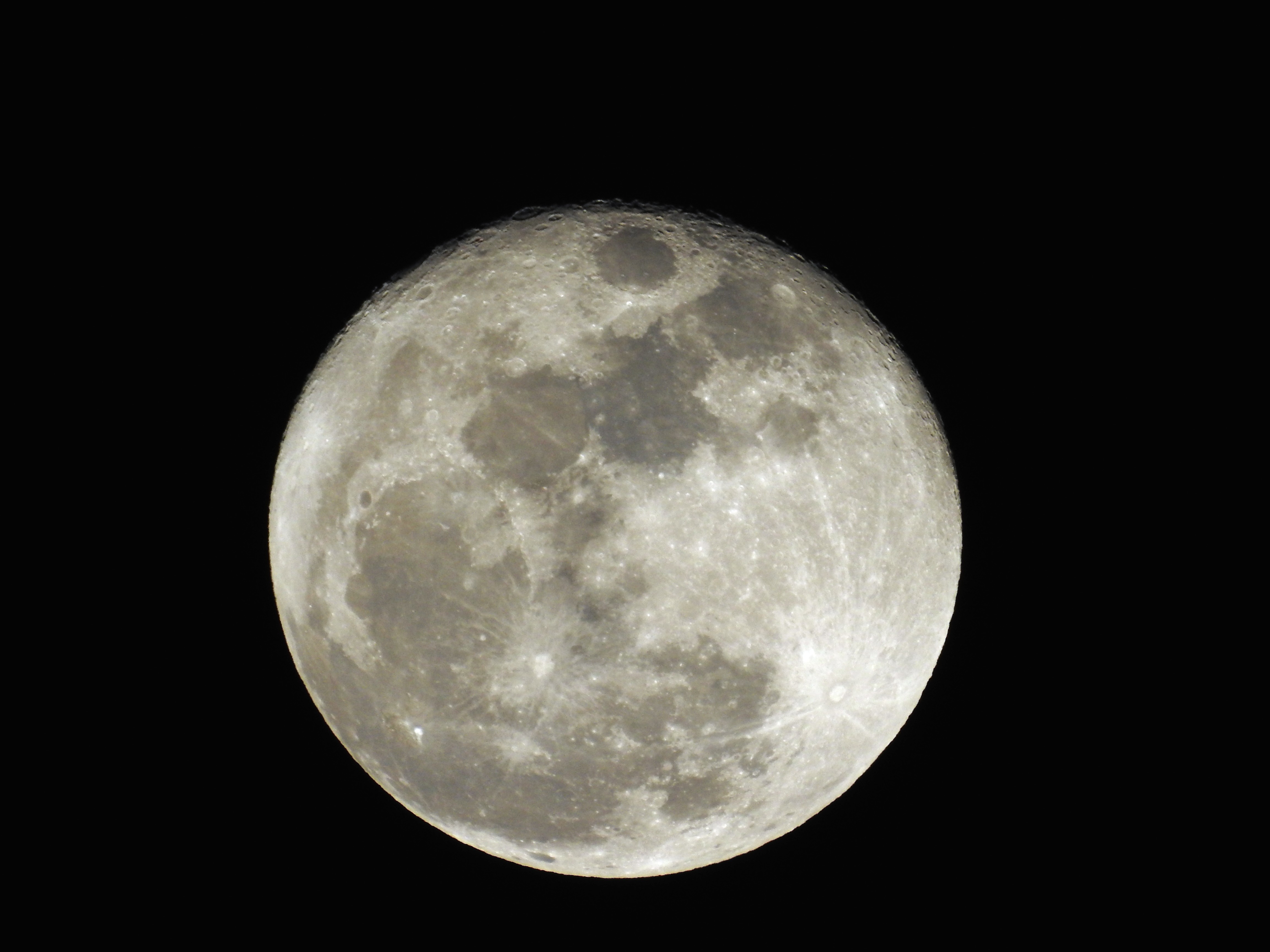
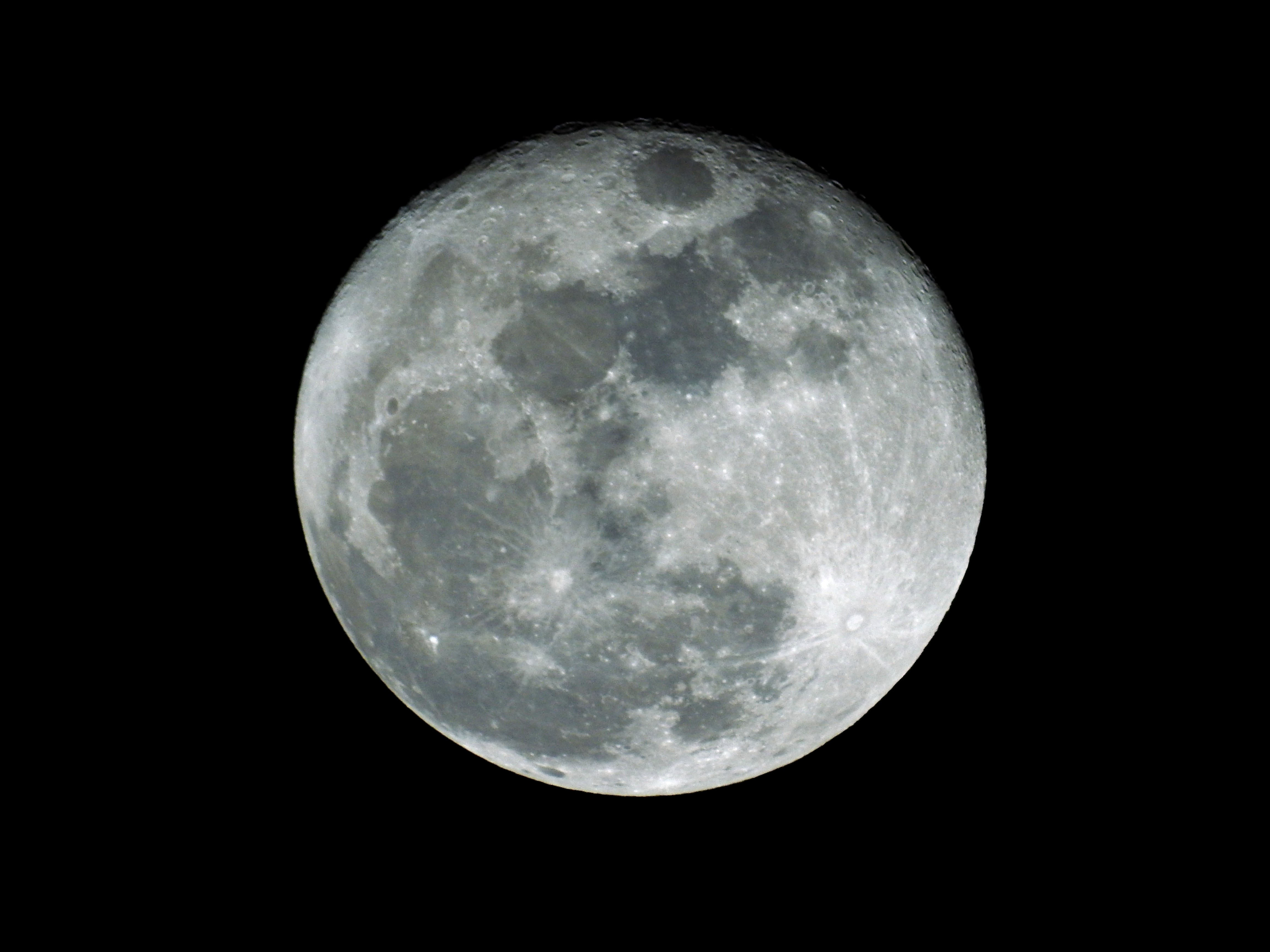
This one had a little digital zoom added as I tested the limits of my camera. Still fairly decent quality I think for what it is and being hand held at somewhere around 86x zoom or so. My kid’s telescope is less powerful. 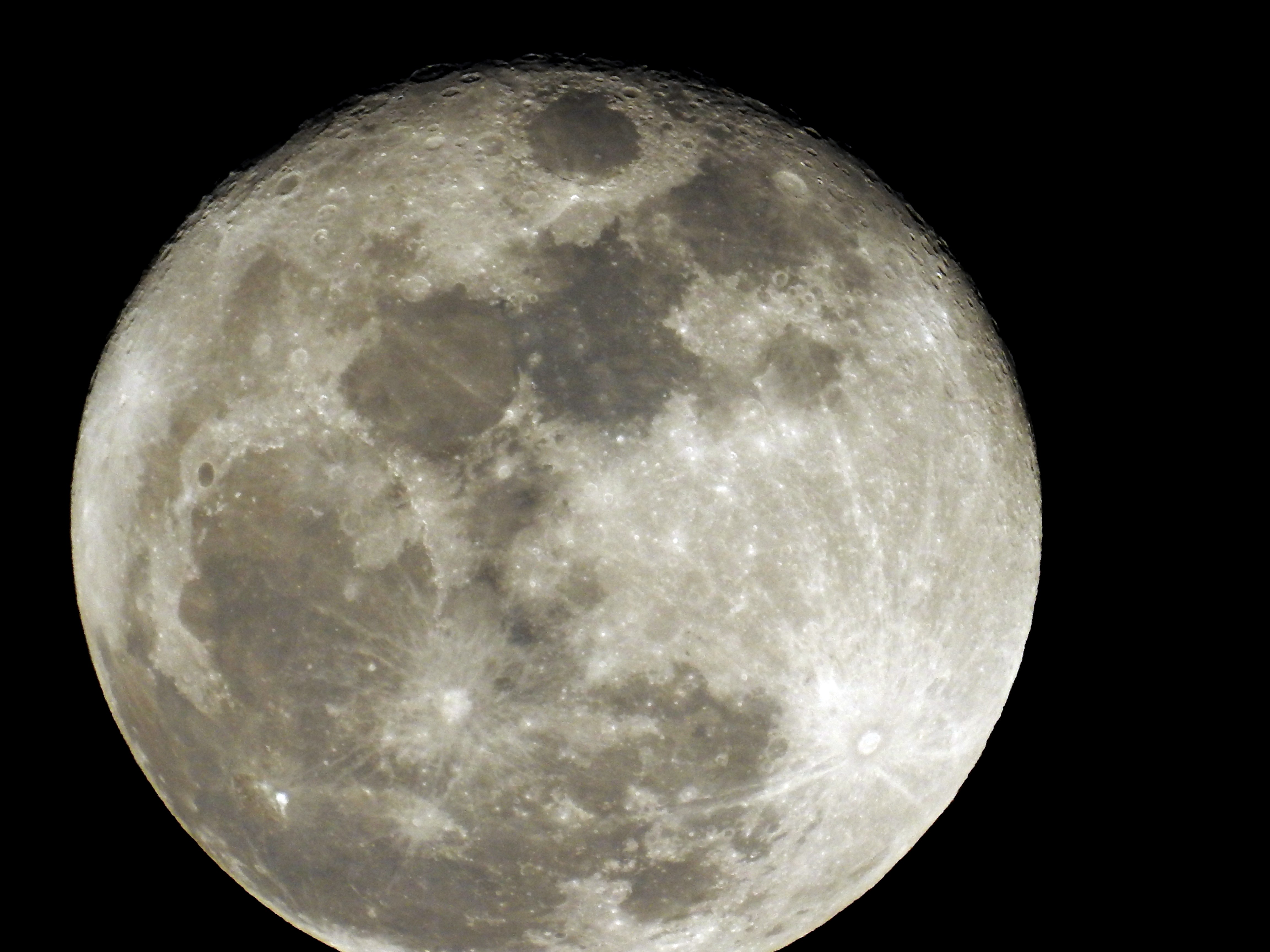
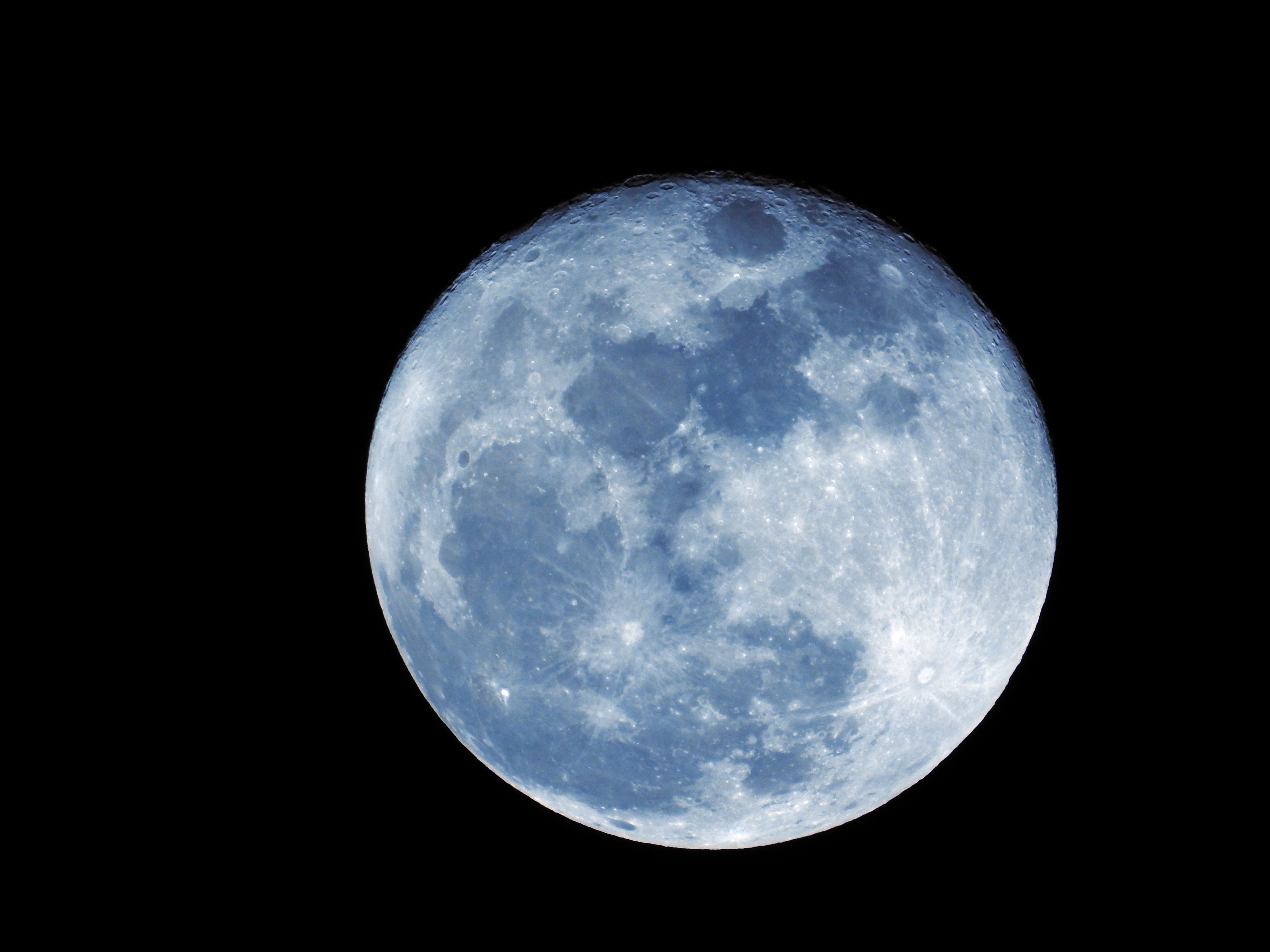
They look good. Your best photos for the moon are going to be during it’s smaller phases, you’ll pick up way more details when the sun is cutting across the surface instead of shining directly at it. Your photos look really good though, all you’d need to do is adjust for overall brightness and color, and add a little sharpness to bring out some of the smaller details. You don’t want to over-process either, adding false color will make it look weird. And, you can drop the saturation or change the photo to B&W and it’ll still look good.
Hope you don’t mind I played with the photo…
[External image (i15.photobucket.com), not copied]
Nice. Looks like you touched up some darker areas with the burn tool? I had a different image from 2 months ago with a half moon where I was playing with that too. I was worried about maybe taking it too far and making it too unrealistic but you took it farther than I did so that gives me some confidence I was on the right path.
Wow! Stunning, once you had your way with it, I can really see it.
What would be a decent starter DSLR? If i have lenses for an old school SLR(Minolta), will they swap over to a new camera?
You have to think about how the moon looks to your eye. When it’s close to full it’s bright, and it takes time for your eyes to adjust to it to see the detail. Photos should be similar, it should be bright, but you should see all of the detail. All I did was boost clarity a bit to bring out the subtle details, then work on the brightness and contrast. Simple edits, nothing special or outrageous.
Starter DSLR…asking and answering questions like that is hard, because it’s different for everybody and there’s a lot to choose from. If you prefer Canon, any of the “T” series are perfect. T5, T5i, etc. Even the older versions are great. The problem with giving gear suggestions is that it’s more about the lenses than the bodies. You have to figure out what you want to shoot, and use the types of lenses that are designed to work with those subjects.
PROTOOLNUT wrote:
1 hour ago, PROTOOLNUT said:Well, everybody could use a good macro lens and most people don’t need an 86x zoom lens either. Infact my point and shoot camera has 10X, and that has been more then enough.
Depends on your subject matter. My old Panasonic Lumix was 10x and I wouldn’t go back for money. I’m a wildlife buff and I have a lot of shots that would be impossible with 10x even at 100% crop with higher quality due to more pixels from a lack of cropping. On a photography forum I periodically visit after buying this camera to learn more about it, there’s people with 10k worth of rigging that picked up this camera and think it’s awesome for it’s capability, and often even leave their cumbersome gear at home and take this instead. Reviews like that are the reason I purchased, and now it’s very difficult to buy because demand far exceeded production and Nikon can’t keep up.
I can fill my frame with a butterfly that’s 30ft away. Maybe you don’t like that. Beats me why.
As for macro, my lense is fixed and goes from 24-2000mm, and will focus at 1cm from the lense. It’s not a single sided deal like interchangeable lenses are. Not that they don’t have their positives, the best photography in the world isn’t coming out of bridge cameras for sure… but I don’t wish to spend thousands of dollars to drag equipment around because I’m not a professional. On the other side, I can take many shots even the most expensive rigs can’t.
It’s all give and take.
There’s no such thing as good or bad…well, technically there is but it’s all in what you do with it. I get into arguments with my photo friends about things like raw-v-jpg and how jpg doesn’t give you the ability that raw does. I say that most of the time you have control over lighting, setting, etc., so raw isn’t necessary. Then people will argue Canon-v-Nikon, and my opinion is that neither one is better than the other, they both do the same thing.They might go about it differently, but you get the same results.
I shot for a couple of years with Fuji bridge cameras, and while they were lacking in some ways, they got the job done as far as I was concerned. I wanted a photo, I got a photo. Point-n-shoots and bridge cameras have come a long way, with regards to noise handling, shoot speed, color and clarity quality, they’re a lot better than they used to be. And again, if you have control over your lighting, subject, etc., they’ll give you fantastic photos.
Once I get it put together I’m gonna post some stuff on how to get results from minimal gear. You’ll see that the bottom line is this: It’s how you shoot, not what you shoot with.
Here’s the beginning of a product-type shoot. I’m using bare minimum stuff, and what would be considered lower-quality gear. The stuff I’m using is my wife’s point-n-shoot Casio Exilim EX-Z75, my iPhone 6 Plus, and a spoon. I’m starting out in the garage, on the workbench, where lighting is four 4′ fluorescent fixtures on the ceiling, and one 4′ drop light over the bench. It gives nice bright, even light on the workbench surface, so shadows can be controlled. Workbench surface is uniform in color, and clean, so there’s no distraction from the subject and no worries about incorrect color tones in the overall photo. I will make a separate post showing how to edit these photos, for now it’s just about setup and lighting.
[External image (i15.photobucket.com), not copied]
First shot is with flash, no spoon…
[External image (i15.photobucket.com), not copied]
Second shot, flash with spoon under it…
[External image (i15.photobucket.com), not copied]
Another direct flash…
[External image (i15.photobucket.com), not copied]
And with the spoon…
[External image (i15.photobucket.com), not copied]
Obviously there’s a fair amount of different with and without the spoon. Light is more even with the spoon, color tones are better. For a comparison, here are some shots taken with the iPhone, no flash, just ambient light…
[External image (i15.photobucket.com), not copied]
[External image (i15.photobucket.com), not copied]
It’s not a problem letting the camera choose settings, but if you have the ability try changing things like ISO values, aperture (if you have that ability) exposure values, etc.. But, with decent light and some tricks (like the spoon) your photos will start out better, and you’ll have an easier time editing them if need be. The iPhone photos, cellphone cameras these days are pretty good for some photography, and if done right the results are good enough for most people. However, for product shots you want to showcase the product, so the more you can do to help get decent results the better. The cellphone shots are good because that’s how good the quality is of the cellphone camera and in-camera processing. Again though, lighting plays an important part, I have good light over the bench so the camera doesn’t have to fight to compensate.
PROTOOLNUT wrote:
9 hours ago, PROTOOLNUT said:I am not a professional either. Infact back in the film days with a 35mm, only half my shots turned out good. Either piss poor lighting or operators error. And then when I got my first digital camera back year 2000, I couldn’t understand why my pictures were so crappy, turns out early original digital tech, what you expect? Then in 2013 I picked up my Canon, and that kind of brought me back into photography again, cause for the first time ever, I have been able to take pictures that are not half bad, with a few being absolutely incredible.
How much is a bridge camera vs a professional DSLR?
My Nikon P900 is widely regarded as the best available bridge and is on the higher end of the spectrum, but still cheap compared to full DSLR depending on how high end you go. I got mine on sale early on for about $550 but often around $600 is retail, wich is probably low to mid level DSLR comparable.